
Invoices
Supplier, invoice number, dates, line items, tax and totals; match to the PO.
AI reads your invoices, orders and forms, a person checks only the exceptions, and the data lands in your system.
Every business has a stack of documents that someone reads and types into another system: supplier invoices into accounting, purchase orders into the ERP, resumes into the applicant tracking system, patient forms into the practice software. AI document processing does that reading for you. It understands the document, not just the text on it, so it can find the invoice total, the PO number or the policy expiry date even when every sender uses a different layout.
SharpQuest delivers AI document processing with dQuest.ai, our own document AI platform, and connects it to the systems you already use. Documents come in by email, upload or shared folder; dQuest extracts and checks the data; your team reviews anything uncertain; the result goes to your ERP, CRM or database.
Start with the document your team types in most.
Supplier, invoice number, dates, line items, tax and totals; match to the PO.

Customer, items, quantities, prices and ship dates, ready to enter as a sales order.

Contact details, skills, experience and education, into your ATS or job application.

Patient details, insurance and history from intake forms, under a HIPAA business associate agreement.

Coverage amounts, policy numbers and expiry dates, checked against your requirements.

Merchant, date, amount and category, into your expense or accounting system.

Parties, dates and key clauses, with a summary for review.

dQuest.ai can be set up for any document type your business handles.
Documents arrive from an email inbox, an upload, SharePoint or Azure Blob storage, or through the API. PDFs, Word files, scans and photos.
AI identifies the document type and reads it, including tables and scanned pages.
The fields you need are pulled out into structured data.
Rules check the data: totals add up, required fields are present, the PO exists, dates are valid.
Anything that fails a rule or that the AI isn't sure about goes to a person, side by side with the document. Process overnight, review during office hours.
Approved data goes to your ERP, accounting, HR or other system through the API or an integration we build.
dQuest.ai is SharpQuest's platform for AI document processing. With it you can:
| Item | Traditional OCR | AI document processing |
|---|---|---|
| What it does | Turns an image into text | Understands the document and returns the fields you need |
| New layouts | Needs a template per layout | Handles layouts it hasn't seen |
| Tables and line items | Often breaks | Reads them as tables |
| Checking | None | Validation rules + confidence per field |
| Output | Text | Structured data for your system |
We built dQuest.ai, so we can add a document type, a rule or an integration your process needs, instead of working around a third-party product.
Azure OpenAI, OpenAI or Google Gemini, on your account or ours.
We're a software development company; posting data into your ERP or line-of-business app is the part we do every day.
You decide what's automatic and what a person checks.
We sign a business associate agreement for healthcare documents.
Prove it on your own documents, then add more.
One client project, four demos anyone can try, and the AI we run on our own site.
IntelliBee uses dQuest.ai to read candidate resumes and feed the data into their applicant tracking system. We had it running within a week.
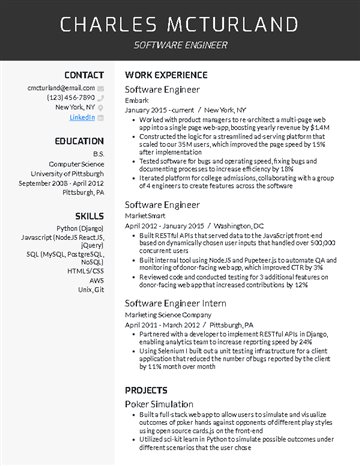
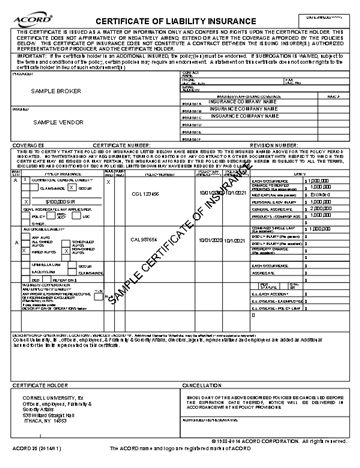
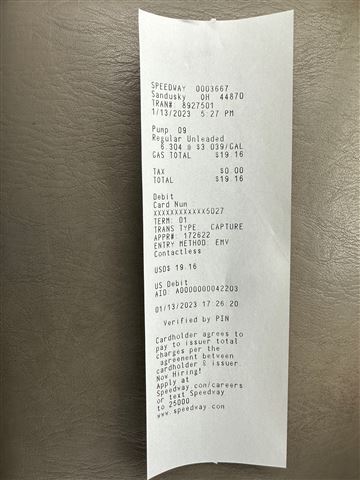
Our careers page reads an uploaded resume with Azure OpenAI and fills in the job application for the candidate. See the careers page
Try your own documents on dQuest.ai: 100 pages a month, no cost. Start free ↗
Sr. Manager - IT, SanDisk (Western Digital Company)
The SharpQuest team built an easy-to-use application that is well integrated with our existing ERP/data warehouse. It was well received by the business users due to its user-friendly UI, accuracy of data, and responsiveness.
IT Manager, TKS Industrial Company
When I first began working with SharpQuest, I was really out of my lane. The team has always assisted with providing clear guidance on the projects we have worked together on. We have really updated the use of the sql database, and it continues to evolve. They are very much in tune with what we ask, and can usually create this to work exactly the way we ask. It's a pretty high quality tracking space.
Software that reads documents such as invoices, forms and resumes, pulls out the data you need, checks it and sends it to your systems, instead of a person typing it in. It's also called intelligent document processing (IDP).
OCR turns an image into text. AI document processing understands that text: it knows which number is the invoice total and which date is the due date, even when layouts differ, and returns structured data.
Any type: invoices, purchase orders, resumes, patient forms, certificates of insurance, receipts, contracts and your own forms. PDFs, Word files, scans, photos and emails.
It depends on the document type and scan quality. Clean, typed documents extract very reliably; handwriting and poor scans less so. We measure accuracy on a sample of your own documents during the pilot, and anything the AI isn't sure about goes to a person.
They go to a review queue with the document shown next to the extracted fields. A person corrects them, and the data continues to your system.
Yes. It doesn't rely on a template per supplier, so new layouts work without setup.
It can read clear handwriting, such as filled-in form fields, but accuracy is lower than for typed text. We test your handwritten forms in the pilot and set the review rules to match.
Through the dQuest API, or an integration we build into your system. See AI integration for ERP.
Yes. We sign a HIPAA business associate agreement (BAA) with healthcare clients. If you want dQuest to use OpenAI or Google Gemini instead of the default Azure OpenAI, you link your own account with that provider, under your own BAA with them.
You choose: Azure OpenAI, OpenAI or Google Gemini, and you can link your own account. If you don't choose, dQuest uses Azure OpenAI, where Microsoft states your data isn't used to train the models. dQuest.ai doesn't share your documents with third parties.
dQuest.ai has a free Community plan (100 pages a month), a Pilot plan (the first 6 months free, which works out to 50% off the first year) and Enterprise pricing based on volume and document types. Integration work with your systems is quoted separately.
You can try standard documents on the free plan right away; for one client, IntelliBee, resume processing into their ATS was running within a week. A pilot on your own document type takes 2 weeks or more, depending on scope; a full integration with your systems takes 8 weeks or more.
Yes, that's what we recommend. Start with the highest-volume document, measure the time saved, then add others.
Share a few examples of the document your team types in most. We'll show you what AI extracts from them in a free consultation.
Tell us what you want to build and we'll set up a free consultation.
Our team will review it and get back to you within 2 business days.
Prefer to pick a time? Book a call with us
Need to talk sooner? Call us at (248) 268-2592 during Eastern Time business hours.